If you’re in the business of creating videos, you should have a properly optimized YouTube channel to make sure your videos aren’t all for naught. But what exactly does an optimized YouTube channel look like and how do you apply optimizations to your channels?
There are so many channels that rely on things like a creative YouTube channel name or a random funny cat video to get views, but it takes more than that. And the good thing is once you do all of the upfront work on your channel, you can sit back and watch it grow.
With over a billion unique YouTube visitors per month, there is a large potential audiences for every video you upload. So, let’s take a look at some of the strategies you can apply to your channel and the best ways to optimize your YouTube channel for SEO.
Table of Contents
10 Strategies to Optimize Your YouTube Channel
- Use keywords in your titles and descriptions
- Add a transcription in the description field
- Say the keyword in the video
- Add hyperlinked citations for Key Moments
- Create impactful thumbnails
- Include related tags and hashtags
- Add cards to cross-promote
- Utilize end screens as calls-to-action
- Keep it organized with playlists
- Add accurate closed captions
Use Keywords in Your Titles and Descriptions
Video titles are extremely important for Google searches. But it’s not the cool, funny name you came up with for your YouTube video that search engines care about. It’s keywords.
Your title should include a keyword that will help you rank on Google. You can produce a high-quality video, but if your title doesn’t include a keyword, it may not get the views you want. But make sure to optimize your titles for keywords that fit naturally into a title and tell your viewers exactly what they’re about to see.
Your video descriptions are also critical. And don’t forget to include keywords here. Make sure it’s at least 250 words. This is all critical for YouTube SEO because peoples search on YouTube, just like they do Google, except they’re looking for video content as opposed to a blog
Add a Transcript to the Description Field
Speaking of the transcript, be sure to add it to the description field as well. According to Google, transcripts are a simple way of creating captions. And if your transcript is naturally keyword-optimized for your topic, it’s great fuel for YouTube SEO.
Say Your Keyword In Your Video
Your targeted keyword should appear in the title, description, tags, and in your transcript. You can use marketing analytics software like SEMrush to help find your keyword, or Keyword Tool for YouTube.
Add Hyperlinked Citations for Key Moments
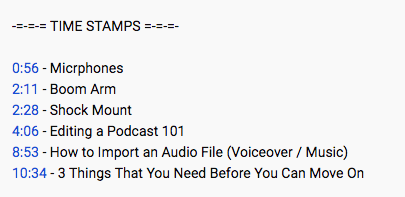
The “key moments” feature is designed to help searchers quickly find content within a video, based on timestamps provided within the video’s description.
Here’s the example Brendan used in his blog. A timestamp is given to each topic that is referred to in the video. It helps to make your video more “viewer-friendly” because if you click on 0:56 it takes you right to the “microphones” portion of the video. The same thing will happen with regards to “boom arm” when you click on 2:11, “shock mount” when you click 2:28, etc.
Create Impactful Thumbnails
Getting potential viewers to read your titles and descriptions is important, but you can help the cause by creating impactful thumbnails. YouTube will provide you with a few suggestions, but creating (even a screenshot from the video) and uploading a custom thumbnail is not difficult. Think “eye-catching.”
Also, be sure to have your title and thumbnail work together to tell a compelling story.
READ MORE ARTICLES OF MY BLOG